Whether you are operating a small home office, mid-sized company, or large corporation, we have business phone solutions for all your communication needs. Contact us today to receive a quick, no-obligation quote.

See Your Options

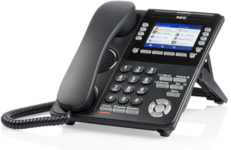
business phone dt830

DT830

IP Phone

DT830 DESI-LESS

  • Full color or monochrome LCD
  • Microphone
  • Soft keys
  • Digital also available
business phone g277

DECT Handset

IP Phone

DECT Handset

  • Lightweight
  • 1.8 in. color display
  • HD audio
  • Belt clip accessory
business phone dt920

DT920

IP Phone

DT920 Desi-less

  • Full color LCD
  • Self-labeling
  • 8, 16, & 32-line options
  • Adjustable stand
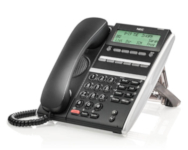
business phone dt410

DT410

Digital Phone

DT410

  • Monochrome display
  • Backlit LCD
  • 2-button (no LCD) or 6-buttion options
  • Adjustable stand
  • Message waiting feature
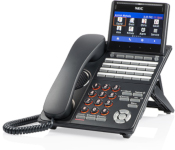
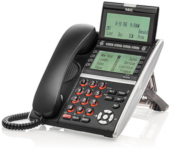
business phone dt930

DT930

IP Phone

DT930 CG

  • Full color LCD
  • 24 or 32-button option
  • Multi-color message waiting indicator
  • Adjustable stand
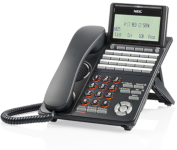
business phone dt530

DT530

Digital Phone

DT530

  • Monochrome display
  • Backlit LCD and keypad
  • 12, 24, and 32-button options
  • Adjustable stand or wall mounted

View all of NEC’s products by downloading this PDF. 

Choose a System

On Premise

  • Purchase or lease the business phone system hardware
  • Keep the server where you can see it
  • Choose from VoIP or Digital options
  • Maintain control of upgrades, maintenance, and expansion

Learn more about On-Premise Phone Systems.

Cloud Hosted

  • Connect your business phone anywhere via the internet
  • Don’t hassle with business phone system updates and maintenance
  • Combine your phone system, chat, video, screen sharing, file management and conference calling into one seamless experience

Learn more about Cloud Hosted phones.

You have choices, we have business phone solutions. If you need help deciding, we’re just a call away.

Explore Accessories and Features

  • Combine remote and office voicemail into a single mailbox
  • Use a single phone number for remote and office calls
  • Receive incoming office calls on your mobile phone.
  • Seamlessly transfer calls between your cell phone and office phone
  • Mask outgoing mobile phone calls as calls from your office phone
  • Remotely control entry to assigned access point
  • Communicate via two-way audio
  • Visual monitoring from any network-connected PC
  • Software for calls made over the internet
  • Installed on a PC or laptop
  • Useful as a remote telephone, desktop phone, or secondary line
  • Use a USB headset for quick response
  • E911 compliance
  • Real-time monitoring of 911 calls
  • Alert personnel during emergency situation via text, email, or phone call
  • Use and maintain emergency location management feature
  • Also known as a “Virtual Receptionist”.
  • Allows callers to select which department they wish to speak to, look up employees in a directory, or play prerecorded messages.
  • Menu options can change based on time-of-day
  • Record calls on-demand or set a automated schedule
  • Save recordings to a local network directory or a remote storage device for easy access
  • Use call recordings for training, monitoring, and quality control
  • Maintain a call while you step away from your desk with mobile handsets
  • Keep employees connected anywhere in the office
  • Integrates with third-party applications
  • Improve teamwork and client relations with video conferencing
  • GT890 IP desktop phones integrate audio and video for seamless meetings
  • Maintain professional meetings and collaboration even when working from home